How to Use HiKorea: Visa Applications, Immigration Reservations, and Online Services

HiKorea is Korea’s main immigration service portal for reservations, electronic applications, stay information, and administrative guidance for foreigners.
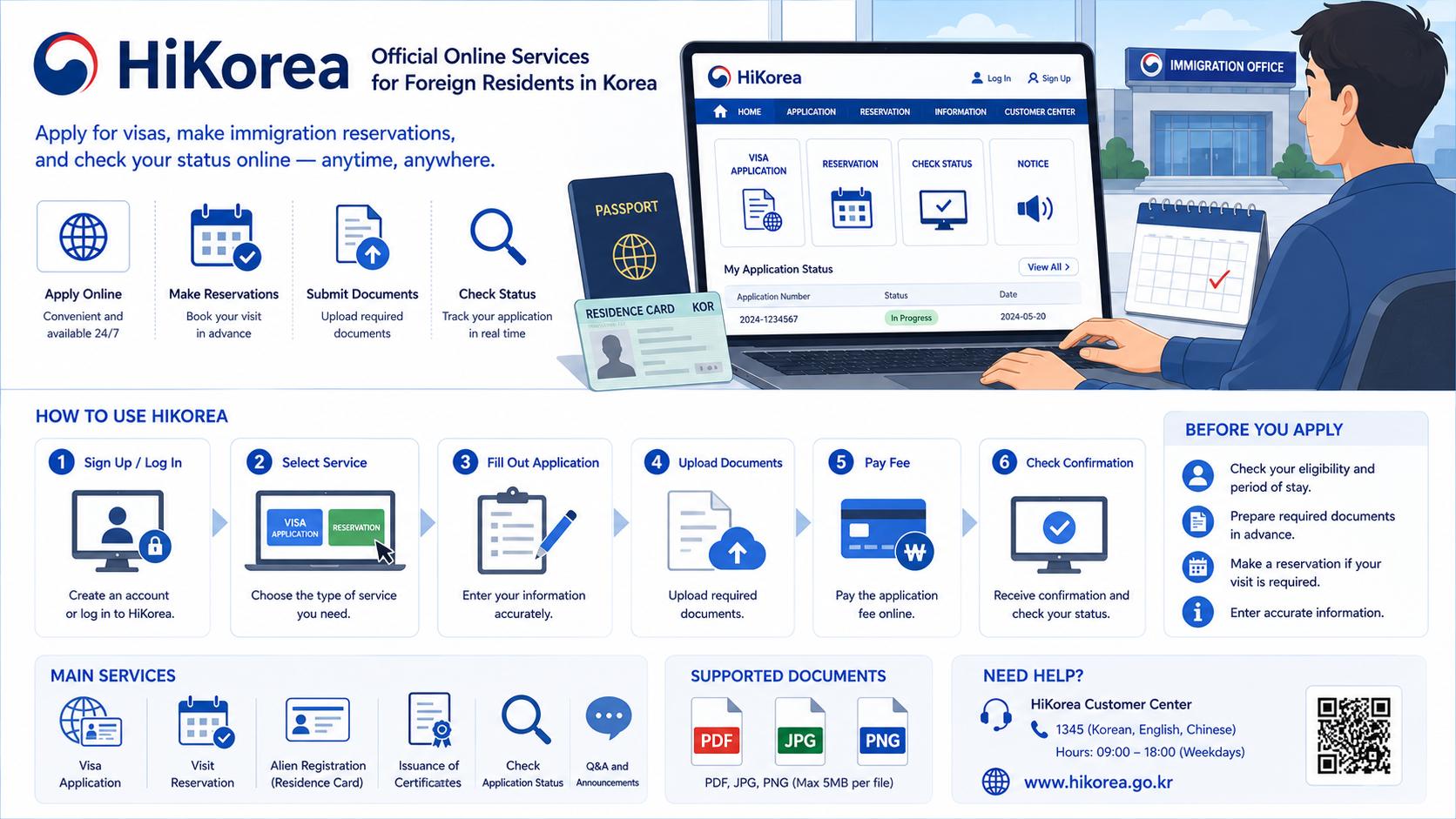
What Is HiKorea?
HiKorea is an official online portal for immigration and foreign-resident services in Korea. It provides immigration information, electronic civil applications, office reservations, and guidance about residence procedures.
The portal is useful, but it can be difficult for first-time users because similar services may have different requirements. Some applications can be completed online, while others still require an immigration-office visit.
What Can You Do on HiKorea?
| Service | What It Is Used For | Important Check |
|---|---|---|
| Visit reservation | Reserve a date and time at an immigration office | Choose the correct office and service |
| Electronic civil application | Submit eligible immigration applications online | Check whether your case is supported online |
| Application status | Review processing information for supported applications | Keep the receipt and reference number |
| Stay information | Review guidance about residence and immigration procedures | Requirements vary by visa and situation |
| Office information | Find immigration office jurisdiction and contact details | Confirm the office responsible for your address |
Who Should Create a HiKorea Account?
- Foreign workers managing visa or workplace changes
- International students extending or updating status
- Marriage immigrants and family-visa holders
- Long-term residents reporting address or residence changes
- Employers or authorized representatives using supported services
Before Using HiKorea
Prepare your information before starting. Online sessions may expire, and incomplete files can delay submission.
- Passport information
- Residence card information
- Current Korean address
- Visa type and expiration date
- Korean phone number and email
- Scanned documents in an accepted format
- A payment method accepted by the service
How to Make an Immigration Office Reservation
- Open the official HiKorea website.
- Sign in or access the supported reservation service.
- Select the correct immigration office.
- Select the service that matches your application.
- Choose an available date and time.
- Enter the requested applicant information.
- Save or print the reservation confirmation.
How to Choose the Correct Immigration Office
Immigration offices normally serve specific jurisdictions. The closest office is not always the office responsible for your registered address.
- Check your officially registered Korean address.
- Use the HiKorea office-jurisdiction information.
- Confirm before booking if you recently moved.
- Report your new address separately if it is not updated.
What If No Reservation Is Available?
Popular immigration offices can have limited appointment availability. Do not wait until the final days before visa expiration.
- Check the system again for cancellations.
- Confirm whether your application is available electronically.
- Contact the immigration information service for procedural guidance.
- Keep screenshots showing your attempt to book, but do not assume this automatically extends a deadline.
- Prepare all documents while waiting for an appointment.
Using Electronic Civil Applications
HiKorea provides online applications for eligible immigration services. The electronic civil-application service operates during the hours announced on the official portal and may be unavailable on weekends or public holidays.
Before Submitting Online
- Confirm that the exact service is available online.
- Check whether all applicants in your visa category are eligible.
- Prepare clear and complete file scans.
- Use consistent name, address, and date formatting.
- Check the fee and accepted payment method.
After Submitting
- Save the submission receipt.
- Record the application number.
- Check for requests for additional documents.
- Respond before the stated deadline.
- Do not assume submission means approval.
Common Document Upload Problems
| Problem | How to Prevent It |
|---|---|
| Unreadable scan | Use a clear scan with all corners visible |
| Wrong document type | Read the description for each upload field |
| Expired document | Check issue and validity dates |
| Name mismatch | Use the passport spelling consistently |
| Missing translation | Confirm whether a Korean translation is required |
| File too large | Compress the file without making it unreadable |
Visa Extension Through HiKorea
Some visa-extension cases may be supported online, while other cases require an office visit. Availability can depend on visa type, applicant circumstances, and the nature of the extension.
Start preparing well before expiration. Additional-document requests, payment problems, or technical errors can take time to resolve.
Address Change and Other Reports
Certain reports may be available through online channels, but the accepted method depends on the case. Keep proof after completing any report.
- Save the completed application screen.
- Download the receipt if available.
- Confirm that the new information appears correctly.
- Do not submit duplicate reports unless instructed.
Technical Problems: What to Do
- Take a screenshot of the error message.
- Record the date and time.
- Check whether the service is within official operating hours.
- Try a supported browser and allow required pop-ups.
- Check the file name, size, and format.
- Contact the official service channel if the problem continues.
What HiKorea Cannot Guarantee
- Approval of a visa or residence application
- Acceptance of incomplete evidence
- Automatic extension because no reservation was available
- Correction of information held by another government agency
- Legal advice for complex disputes
Common Mistakes Foreign Residents Make
- Choosing the wrong immigration office
- Booking a general service instead of the correct application type
- Waiting until the visa-expiration week
- Uploading screenshots instead of complete documents
- Ignoring requests for additional information
- Assuming online submission gives permission to work or travel
- Failing to save the receipt
Frequently Asked Questions
- Can every visa application be completed online?
No. Online availability depends on the service, visa type, and individual case. Check the electronic civil-application menu.
- Does making a reservation protect me from missing a deadline?
Do not assume that a future appointment automatically protects your status. Confirm the proper filing procedure before the deadline.
- Can I leave Korea while an online application is pending?
Departure can affect certain pending applications. Obtain official confirmation before traveling.
- What should I do if the information is only in Korean?
Use the available language options and contact the official immigration information service when the procedure remains unclear.
Final HiKorea Checklist
- I checked my visa expiration date.
- I selected the correct immigration office.
- I confirmed whether the service is online or in person.
- I prepared complete and readable documents.
- I saved my reservation or application receipt.
- I will check for additional-document requests.
- I will confirm before traveling or starting new work.
Related Articles
- Visa Extension in Korea Complete Guide
- Alien Registration Card Guide
- How to Report an Address Change
- Korean Immigration Office Visit Checklist
- What to Do If Your Visa Application Is Delayed
Official HiKorea portal: https://www.hikorea.go.kr
ログインしていません。